
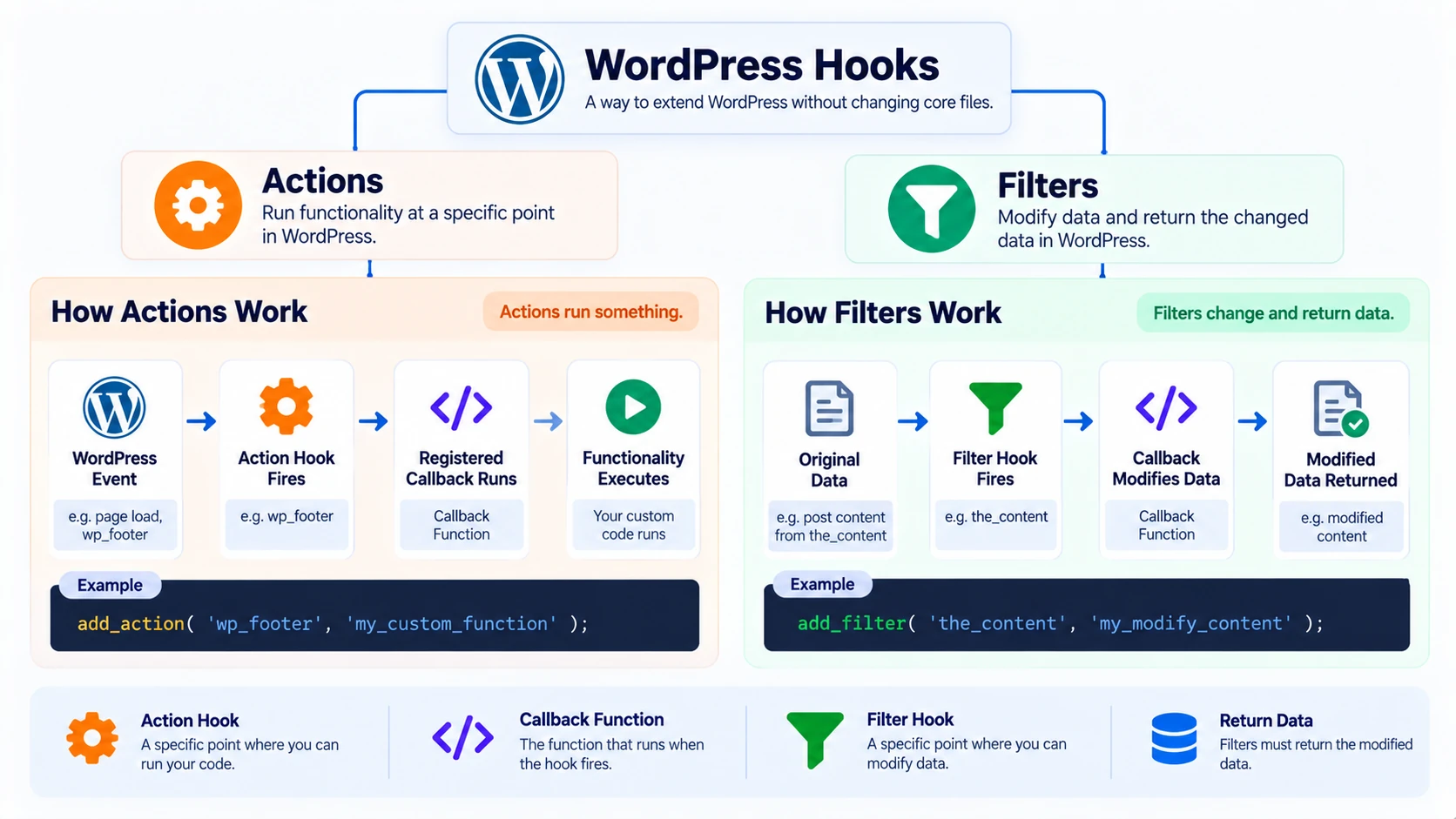
WordPress hooks are one of the most important concepts to understand if you want to move beyond basic WordPress site building and start developing themes or plugins.
Hooks allow your code to interact with WordPress at specific points without editing WordPress core files. You can use them to run custom functionality, modify content, change values, add admin features, load assets, or create extension points for other developers.
There are two main types of WordPress hooks: actions and filters. Actions are generally used to run code when something happens. Filters are used to receive a value, modify it, and return the changed value.
In this guide, you will learn how hooks, callbacks, priorities, and arguments work, how to create your own hooks, and how to avoid common mistakes when using actions and filters.
What Are WordPress Hooks?
A hook is an extension point in WordPress.
The official WordPress Hooks documentation explains how actions and filters let one piece of code interact with another at predefined points.
WordPress Core, themes, and plugins contain many places where a hook can run. Developers can attach callback functions to those hooks instead of changing the original code.
A simple mental model is:
WordPress reaches a hook -> the hook fires -> registered callbacks run -> WordPress continues
For a filter, the flow is slightly different:
A value reaches the filter -> callbacks modify the value -> the modified value is returned
This is one reason WordPress is so extensible. Different plugins can attach functionality to the same system without directly rewriting WordPress Core.
Why WordPress Hooks Matter
Without hooks, developers would often need to modify existing files whenever they wanted to customize WordPress behavior. That would create several problems:
- updates could overwrite changes
- plugins could conflict more easily
- customizations would be harder to maintain
- themes and plugins would be harder to extend
- developers would need to modify code they do not own
Hooks provide a cleaner system. For example, a plugin can attach a function to an admin hook to create a settings page. A theme can attach a callback to wp_enqueue_scripts to load a stylesheet. Another plugin can filter post content before it is displayed.
This hook-based architecture is a core part of professional WordPress plugin development.
Actions vs Filters
| Actions | Filters |
| Run code at a specific point | Modify data |
| Trigger functionality | Transform a value |
| Usually do not return a value to the action | Must return the filtered value |
| Registered with add_action() | Registered with add_filter() |
| Triggered with do_action() | Triggered with apply_filters() |
A useful rule is: Use an action when something should happen. Use a filter when something should change.
What Is a Callback Function?
A callback is the function that WordPress runs when a hook fires.
function ctg_footer_message() {
echo ‘<p>Thanks for reading.</p>’;
}
This function does nothing by itself. To run it when WordPress reaches the footer hook, register it:
add_action( ‘wp_footer’, ‘ctg_footer_message’ );
Now wp_footer is the hook and ctg_footer_message is the callback. When WordPress fires the wp_footer action, your function runs.
- class methods
- static methods
- anonymous functions
- other valid PHP callables
For beginner code, named functions are often easier to understand, debug, and remove later.
How add_action() Works
add_action( $hook_name, $callback, $priority, $accepted_args );
Hook Name
The name of the action you want to use, such as wp_footer.
Callback
The function that should run.
Priority
Determines when the callback runs relative to other callbacks attached to the same hook. The default is 10.
Accepted Arguments
Tells WordPress how many arguments your callback expects from the hook. The default is 1.
You can review the official add_action() reference when you need to check priority, accepted arguments, or usage details.
add_action( ‘wp_footer’, ‘ctg_footer_message’ );
Basic add_action() Example
function ctg_footer_message() {
echo ‘<p class=”ctg-footer-note”>Built with WordPress.</p>’;
}
add_action( ‘wp_footer’, ‘ctg_footer_message’ );
When WordPress reaches wp_footer, the callback runs. This example is intentionally simple. In a real project, also consider whether the output is appropriate for that hook and whether it needs escaping.
What do_action() Does
add_action() connects a callback to a hook. do_action() creates or fires an action hook.
do_action( ‘ctg_after_profile’ );
This tells WordPress to run every callback registered to ctg_after_profile. Another developer can then write:
function ctg_profile_note() {
echo ‘<p>Profile completed.</p>’;
}
add_action( ‘ctg_after_profile’, ‘ctg_profile_note’ );
When the original code reaches do_action( ‘ctg_after_profile’ ), the callback runs. This is how you can create extension points inside your own themes and plugins.
How add_filter() Works
add_filter( $hook_name, $callback, $priority, $accepted_args );
The critical difference is that a filter callback receives data and should return the value after processing it.
function ctg_modify_title( $title ) {
$title .= ‘ – CareerTechGuide’;
return $title;
}
add_filter( ‘the_title’, ‘ctg_modify_title’ );
Basic Filter Example With the_content
function ctg_add_article_note( $content ) {
if ( is_singular( ‘post’ ) && in_the_loop() && is_main_query() ) {
$content .= ‘<p class=”ctg-article-note”>Continue learning with our WordPress development guides.</p>’;
}
return $content;
}
add_filter( ‘the_content’, ‘ctg_add_article_note’ );
A filter must return the value it wants WordPress to continue using. Additional arguments passed to a filter provide context, but the primary filtered value is the value the callback returns. If you forget the return value, you can accidentally break or remove the filtered output.
What apply_filters() Does
apply_filters() creates or runs a filter hook.
$title = ‘Developer Profile’;
$title = apply_filters( ‘ctg_profile_title’, $title );
function ctg_change_profile_title( $title ) {
return ‘WordPress ‘ . $title;
}
add_filter( ‘ctg_profile_title’, ‘ctg_change_profile_title’ );
The original value Developer Profile can become WordPress Developer Profile without editing the original plugin code. That is the power of filter hooks.
WordPress Hook Priority Explained
Multiple callbacks can use the same hook. Priority controls their execution order.
add_action( ‘wp_footer’, ‘ctg_first_callback’, 5 );
add_action( ‘wp_footer’, ‘ctg_second_callback’, 20 );
| Priority | Execution |
| 5 | Earlier |
| 10 | Default |
| 20 | Later |
Priority does not mean importance. It only controls order. If two callbacks have the same priority, WordPress generally runs them in the order they were registered.
Accepted Arguments Explained
Some hooks provide extra information to their callbacks.
add_action( ‘some_hook’, ‘ctg_handle_hook’, 10, 2 );
The final value 2 tells WordPress that the callback accepts two arguments.
function ctg_handle_hook( $arg1, $arg2 ) {
// Use the provided values.
}
However, setting accepted_args to 2 does not magically create two values. The hook itself must actually pass them. When using an unfamiliar hook, check its documentation or locate the related do_action() or apply_filters() call to see what arguments it provides.
How to Remove WordPress Hooks
remove_action( ‘wp_footer’, ‘ctg_footer_message’, 10 );
remove_filter( ‘the_content’, ‘ctg_add_article_note’, 10 );
The callback and priority generally need to match the original registration. This is another reason named callbacks can be easier to work with than anonymous functions.
How to Create Custom WordPress Hooks
Custom hooks make your own plugin or theme easier for other developers to extend.
The WordPress Custom Hooks guide recommends exposing well-named custom hooks where other developers may need to extend your plugin.
Prefix custom hook names with a unique plugin or project identifier to reduce the risk of naming collisions.
Create a Custom Action
do_action( ‘ctg_after_profile’ );
function ctg_show_profile_message() {
echo ‘<p>Thanks for visiting this profile.</p>’;
}
add_action( ‘ctg_after_profile’, ‘ctg_show_profile_message’ );
Create a Custom Filter
$label = ‘Developer’;
$label = apply_filters( ‘ctg_profile_label’, $label );
function ctg_customize_profile_label( $label ) {
return ‘WordPress Developer’;
}
add_filter( ‘ctg_profile_label’, ‘ctg_customize_profile_label’ );
The original plugin remains untouched. Custom hooks therefore act as an API for extension.
Where Should Hook Code Go?
Plugin
Use a plugin when functionality should survive a theme change. Examples include custom post types, API integrations, booking logic, admin tools, and reusable business features.
See our WordPress plugin development guide for a complete beginner workflow.
Theme
Theme-specific presentation logic can use hooks inside the theme, such as loading theme styles, layout-related output, and theme setup.
See our WordPress theme development guide for the broader theme architecture.
Child Theme
A child theme can contain hook-based customizations related to an existing parent theme.
If you are customizing a third-party theme, our WordPress child theme guide explains the safer workflow.
Common WordPress Hooks Beginners See
init
Runs during WordPress initialization and is frequently used for registration tasks.
wp_enqueue_scripts
Commonly used for loading frontend CSS and JavaScript.
admin_init
Used for admin initialization tasks such as registering settings.
admin_menu
Used when creating or modifying admin menus.
wp_footer
Runs around the frontend footer area and can trigger footer-related callbacks.
the_content
A filter used to modify post content.
the_title
A filter used to modify titles.
Always check the documentation for the specific hook before using it because context and provided arguments can differ.
Practical Example: Add Content After Every Post
function ctg_post_footer_note( $content ) {
if ( is_singular( ‘post’ ) && in_the_loop() && is_main_query() ) {
$note = ‘<p class=”ctg-post-note”>Explore more WordPress development tutorials.</p>’;
$content .= $note;
}
return $content;
}
add_filter( ‘the_content’, ‘ctg_post_footer_note’ );
The conditional checks help prevent the note from being added in unintended places. This is better than blindly changing every use of the_content.
Practical Example: Run Code in the Footer
function ctg_footer_credit() {
echo ‘<div class=”ctg-footer-credit”>CareerTechGuide</div>’;
}
add_action( ‘wp_footer’, ‘ctg_footer_credit’ );
- create callback
- attach it
- WordPress fires hook
- callback runs
For production code, also consider whether the output should be escaped and whether this hook is the best place for your markup.
Practical Example: Add an Admin Menu
function ctg_register_admin_page() {
add_menu_page(
‘Career Tools’,
‘Career Tools’,
‘manage_options’,
‘ctg-career-tools’,
‘ctg_render_admin_page’
);
}
add_action( ‘admin_menu’, ‘ctg_register_admin_page’ );
Here, the action does not modify a value. It runs a task at the appropriate point in WordPress admin execution.
How to Debug WordPress Hooks
Hook Name
A spelling error means your callback will never connect to the intended hook.
Callback
Confirm the callback exists and is callable.
Priority
Another callback may run before or after yours and change the result.
Arguments
Check how many arguments the hook provides and how many your callback accepts.
Code Location
Confirm the plugin, theme, or child theme containing the registration is actually loaded.
Conditional Logic
A callback may run but immediately fail an if condition.
PHP Errors
Enable appropriate debugging in your development environment and inspect logs.
Execution Order
If several callbacks modify the same value, test priorities and inspect each step.
Do not fix hook problems by randomly changing priorities until something appears to work.
Common WordPress Hook Mistakes
Forgetting to Return a Filter Value
Filters must return the resulting value.
Echoing Inside a Filter
Filters should generally transform and return data rather than directly outputting content.
Using the Wrong Hook
A valid hook used at the wrong stage can still produce incorrect behavior.
Wrong Accepted Arguments
Your callback must match what the hook actually provides.
Assuming Priority Means Importance
It controls order only.
Using Anonymous Functions Everywhere
Anonymous callbacks are useful, but they can be harder to remove later.
Editing WordPress Core
Do not modify core just to insert your custom function. Use existing hooks or create extension points in your own code.
Putting Portable Logic in a Theme
If functionality needs to survive a theme change, move it to a plugin.
WordPress Hooks Best Practices
- use clear callback names
- prefix functions or use namespaces
- return filtered values
- use the lowest complexity necessary
- document custom hooks
- choose priorities intentionally
- accept only arguments you need
- avoid unexpected global side effects
- keep theme and plugin responsibilities separate
- test in a development environment
- use appropriate capability and security checks for sensitive operations
Hooks make code flexible, but too many undocumented callbacks can make execution difficult to understand. Keep extension points predictable.
Actions vs Filters Decision Guide
| If you need to… | Use |
| Run code when an event occurs | Action |
| Modify an existing value | Filter |
| Register a callback to an action | add_action() |
| Register a callback to a filter | add_filter() |
| Create/fire an action hook | do_action() |
| Create/apply a filter hook | apply_filters() |
| Stop an attached action | remove_action() |
| Stop an attached filter | remove_filter() |
If you can identify whether you are performing an event or transforming data, choosing the right hook type becomes much easier.
WordPress Hooks Checklist
- Understand what the hook does
- Identify whether it is an action or filter
- Use a clear callback name
- Register the callback correctly
- Set priority intentionally
- Match accepted arguments to the hook
- Return a value from filters
- Use appropriate conditional checks
- Avoid modifying WordPress Core
- Use unique names for custom hooks
- Test execution
- Check PHP errors
Frequently Asked Questions
What are WordPress hooks?
WordPress hooks are extension points that let themes and plugins run custom code or modify data without directly editing WordPress Core.
What is the difference between actions and filters?
Actions generally perform tasks at specific execution points. Filters receive data, modify it, and return the modified value.
What does add_action() do?
add_action() registers a callback function to run when a particular action hook fires.
What does add_filter() do?
add_filter() registers a callback that can modify a value when a filter hook is applied.
What is a callback in WordPress?
A callback is the PHP function, method, or callable that WordPress executes when the related hook runs.
What is hook priority?
Priority controls the order in which callbacks attached to the same hook run. Lower numbers run earlier. The default is 10.
What happens if a filter does not return a value?
WordPress may receive null or an unintended result, potentially breaking the filtered content or value.
Can I create custom WordPress hooks?
Yes. Use do_action() to create an action hook and apply_filters() to create a filter hook.
Where should I put WordPress hook code?
Place functionality in a plugin if it should survive theme changes. Keep theme-specific presentation code in a theme or child theme.
How do I remove an action or filter?
Use remove_action() or remove_filter() with the matching hook, callback, and priority.
Final Thoughts
WordPress hooks become much easier once you understand the relationship between four concepts: hook -> callback -> priority -> arguments. Actions let code run when WordPress reaches specific points. Filters let code intercept and transform data. add_action() and add_filter() connect your callbacks to existing hooks, while do_action() and apply_filters() let developers create extension points in their own code.
Do not try to memorize hundreds of hook names. Instead, understand the system. Once you can identify whether you need to run an action or modify a value, read the hook documentation, register the right callback, and debug the execution order, hooks become one of the most powerful tools available in WordPress development.
