
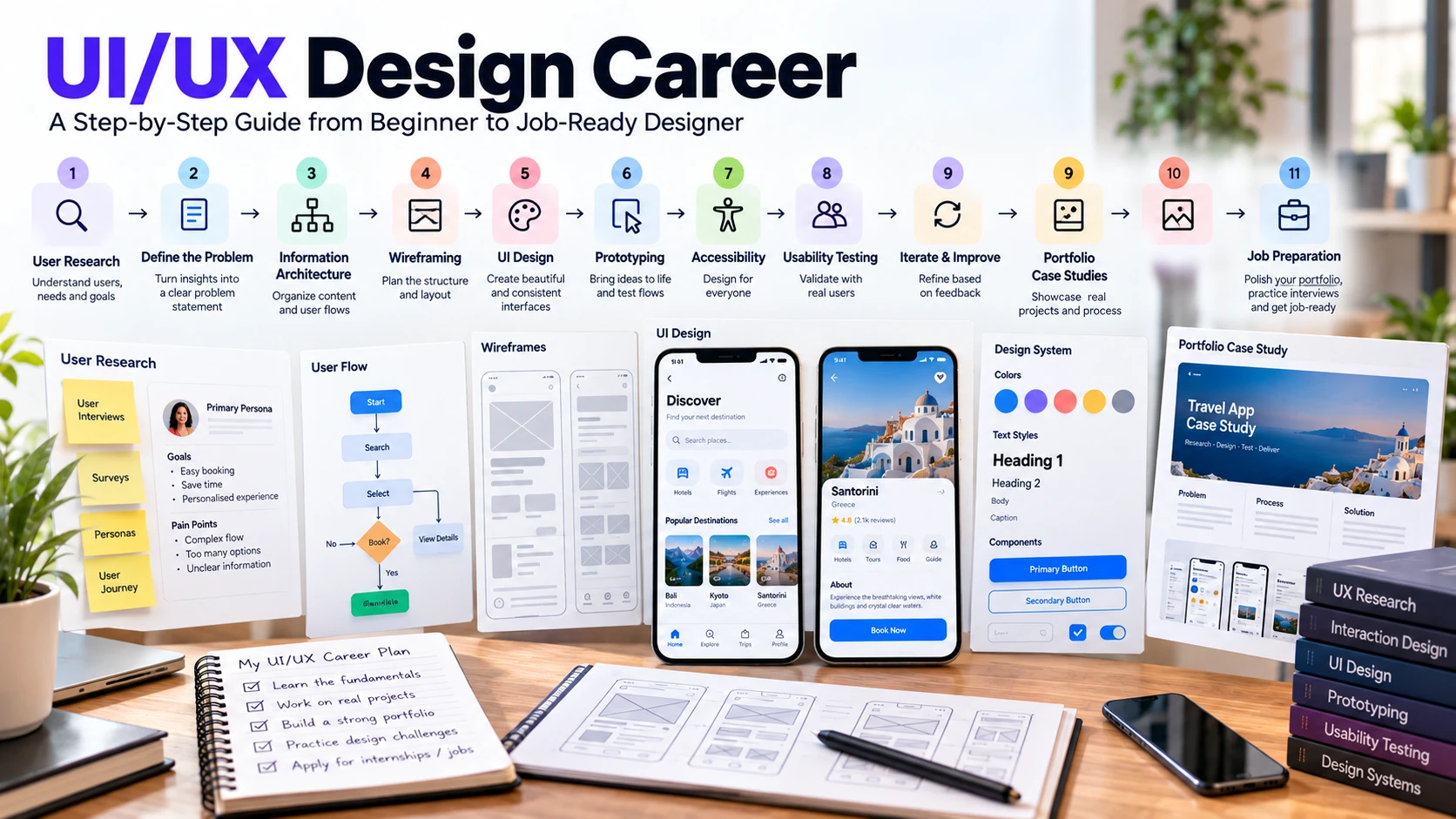
A UI UX design career is not simply about making attractive screens in Figma. Product design work can involve understanding users, defining problems, organizing information, creating interaction flows, designing accessible interfaces, testing ideas, responding to evidence and feedback, and collaborating with developers and product teams.
Beginners often learn the process in reverse: they start with polished mockups and only later discover research, usability, content, constraints, and iteration. A stronger path begins with the problem and user, then moves from structure to interface and validation.
This guide explains the core skills, tools, portfolio evidence, career directions, and practical steps that can help you move from beginner exercises toward entry-level UI, UX, or product-design work.
UI Design vs UX Design: What Is the Difference?
UI design focuses on the interface people interact with: visual hierarchy, typography, color, spacing, components, states, and consistency. UX design is broader. It considers user needs, tasks, information architecture, flows, interaction, research, usability, and whether the overall experience helps people achieve their goals.
The boundary is not identical at every company. One employer may hire separate UX researchers, interaction designers, UI designers, content designers, and design-system specialists. Another may expect one product designer to cover several of those activities. Read actual job descriptions instead of assuming every ‘UI/UX Designer’ role has the same scope.
Is UI UX Design a Good Career?
It can be a suitable career for people who enjoy visual communication, problem solving, user behavior, iteration, and cross-functional work. But claims such as ‘every company needs a UI/UX designer’ or a universal talent shortage are too broad. Demand varies by market, industry, role title, specialization, and economic conditions.
As one U.S.-specific reference point, the Bureau of Labor Statistics projects employment for web and digital interface designers to grow 6% from 2025 to 2035. BLS reports a $104,000 median annual wage for that occupation in May 2025. This category overlaps with some interface-design work but is not a perfect synonym for every UX, product-design, or UI role, so it should not be presented as a universal UI/UX salary.
Use labor data as context, then inspect current vacancies in the country and industry where you want to work. Job titles and expectations can differ substantially.
Essential Skills for UI UX Designers
A strong UI UX design career starts with understanding users and problems before focusing on tools. Build skills in research, information architecture, visual design, interaction, accessibility, and communication so your work is based on clear decisions rather than decoration.
User and Problem Understanding
Learn to separate assumptions from evidence. Understand the business objective, target users, important tasks, constraints, and what success means before deciding what a screen should look like.
User Research
Research methods can include interviews, observation, surveys, usability studies, and analysis of existing evidence. The right method depends on the question. Do not create fictional personas and present them as research; if a learning project uses assumptions, label them honestly.
Information Architecture and User Flows
Practice organizing content, defining navigation, mapping tasks, and identifying decision points. A visually polished interface cannot compensate for a flow that makes the user’s goal confusing.
UI and Visual Design Fundamentals
Learn typography, hierarchy, spacing, alignment, color, grids, iconography, and responsive layout. Use these principles to communicate structure and actions rather than decorating every screen.
Interaction Design and Prototyping
Wireframes help you explore structure cheaply. Higher-fidelity designs clarify visual and interaction details. Prototypes can test important flows before implementation, but fidelity should match the question you are trying to answer.
Accessibility
Accessibility should be considered during design, not added at the end. Learn semantic thinking, keyboard and focus behavior, readable contrast, clear labels, error handling, target sizes, and alternatives where relevant. Use WCAG as an authoritative accessibility reference.
Communication and Collaboration
Designers need to explain decisions, receive critique, negotiate constraints, document behavior, and work with product managers, engineers, researchers, writers, and stakeholders. A portfolio that shows collaboration and iteration can be more informative than one that shows only polished final screens.
UI UX Design Tools Beginners Should Learn
Tools change faster than design principles. Learn enough software to express and test your thinking, but do not treat a tool list as a career roadmap.
| Tool / Category | Use | Beginner Priority |
| Figma | Interface design, components, prototyping, collaboration, handoff | High for many current digital-design workflows |
| FigJam or similar whiteboard | Flows, workshops, mapping, collaborative exploration | Useful when the activity needs it |
| Maze / UserTesting or other research tools | Prototype studies and remote research workflows | Learn the research method before the platform |
| Analytics / feedback tools | Behavioral or product evidence | Relevant when a project has real usage data |
If you need hands-on tool practice, use the Figma tutorial for beginners as a separate learning path.
Adobe XD should not be recommended as a primary new-tool investment: Adobe says XD is in maintenance mode and is not receiving ongoing feature development. Existing teams may still use it, but beginners should understand that status before choosing it.
Complete UI UX Design Career Roadmap
Phase 1 — Learn UX and UI Fundamentals
Study user-centered problem framing, information architecture, usability, typography, hierarchy, layout, color, accessibility, and interaction basics. Outcome: critique an existing flow using specific principles rather than personal taste.
Phase 2 — Learn Figma and Basic Prototyping
Build wireframes, responsive layouts, components, states, and a simple interactive flow. Outcome: a small prototype you can explain rather than a collection of copied screens.
Phase 3 — Practice Research and Problem Definition
Choose a manageable problem, identify assumptions, gather appropriate evidence, and define the user task and constraints. Outcome: a documented problem statement and research notes with limitations.
Phase 4 — Design, Test, and Iterate
Move from sketches to wireframes and a testable prototype. Observe users or run an appropriate usability study, record findings, and revise the design. Outcome: evidence showing what changed and why.
Phase 5 — Build a Small Design System
Create reusable components, variants, naming conventions, and basic documentation. Outcome: consistent screens that can change without manually fixing every instance.
Phase 6 — Build Portfolio Case Studies
Turn your strongest projects into concise case studies showing context, role, evidence, decisions, iterations, collaboration, outcome, and limitations. Outcome: work an interviewer can discuss with you.
Phase 7 — Prepare for Real Roles
Study current vacancies, identify the roles that match your evidence, tailor your portfolio and CV, and practice presenting case studies. Outcome: targeted applications rather than a generic UI/UX profile.
How to Build a UI UX Portfolio That Shows Real Skills
Your portfolio is one of the most important parts of a UI UX design career because it shows how you think, make decisions, respond to evidence, and improve a design—not just how polished the final screens look.
A portfolio should demonstrate judgment, not merely visual polish. Three strong, relevant case studies can be more useful than many shallow projects. There is no universal required number; curate for the role you want.
| Case Study Section | What to Show |
| Context | Product/problem, audience, constraints, timeline |
| Your role | Exactly what you did; credit collaborators |
| Evidence | Research or other inputs and their limitations |
| Exploration | Flows, sketches, alternatives, tradeoffs |
| Design | Important interface and interaction decisions |
| Validation | How you tested or reviewed the work |
| Iteration | What changed after evidence or feedback |
| Outcome | Measured result if real data exists; otherwise state what was and was not validated |
| Reflection | Limitations and what you would improve next |
Redesign exercises can help you practice, but do not invent user research, business results, or client involvement. Explain that the work is self-initiated and identify the assumptions you made.
Do UI UX Designers Need to Know Coding?
Coding is not a universal requirement for every UI or UX role, but saying ‘no coding required’ can be misleading. Designers often benefit from understanding how interfaces are implemented, including responsive behavior, HTML semantics, CSS constraints, component states, and technical tradeoffs.
You do not need to become a frontend engineer unless your target role requires it. Learn enough about implementation to communicate effectively with developers and to avoid designs that ignore platform or accessibility constraints.
UI UX Career Paths You May Encounter
| Role Direction | Typical Emphasis |
| UI / Visual Designer | Interface hierarchy, visual systems, components, responsive layouts |
| UX Designer | Flows, interaction, information architecture, research-informed design |
| Product Designer | End-to-end product problems across UX, UI, collaboration, and iteration |
| UX Researcher | Research planning, studies, analysis, synthesis, communication of findings |
| Interaction Designer | Behavior, states, transitions, task flows, interaction patterns |
| Design Systems Designer | Reusable components, patterns, documentation, governance and consistency |
How to Prepare for Your First UI UX Job
Preparing for a UI UX design career also means matching your portfolio and skills to real job requirements. Review current vacancies in your target market, identify recurring expectations, and focus your case studies on the type of role you actually want.
- Choose a target role instead of applying to every design title with the same portfolio.
- Review current job descriptions in your market and identify recurring skills and deliverables.
- Place the case studies most relevant to that role first.
- Practice presenting one project in 10–15 minutes without reading the page word for word.
- Be ready to explain tradeoffs, weak evidence, failed ideas, and what changed after feedback.
- Understand the design files well enough to demonstrate components, states, flows, and handoff decisions.
- Prepare for critique or design exercises without presenting a single solution as objectively correct.
- Never claim client work, research participants, metrics, or outcomes that did not exist.
For a broader view of adjacent creative roles, compare this path with the graphic design career guide.
Common UI UX Beginner Mistakes
- Learning Figma before understanding users, flows, hierarchy, and usability.
- Treating UX as wireframes and UI as decoration.
- Creating fictional research and presenting it as evidence.
- Showing only final screens in portfolio case studies.
- Copying popular app patterns without explaining why they fit the problem.
- Ignoring accessibility and edge states.
- Building an elaborate design system before the product has enough repeated patterns.
- Using AI-generated personas, findings, or interview quotes as if they came from real users.
- Applying to unrelated design roles without adapting the portfolio.
Frequently Asked Questions
Is UI UX design a good career for beginners?
It can be a suitable path if you enjoy user problems, visual and interaction design, research, iteration, and collaboration. Opportunities vary by market and role, so evaluate current vacancies rather than relying on broad demand claims.
What is the difference between UI and UX design?
UI focuses strongly on the interface and visual system, while UX considers the broader experience, tasks, structure, interaction, and evidence about users. Real job scopes often overlap.
Do I need a degree to become a UI UX designer?
Requirements vary by employer and role. A relevant degree can be useful, but portfolio evidence, problem-solving ability, communication, research understanding, and experience may also be important. Check the actual requirements of your target jobs.
Is Figma enough to become a UI UX designer?
No. Figma is a tool. You also need design fundamentals, user and problem understanding, flows, interaction, accessibility, validation, communication, and portfolio evidence.
Do UI UX designers need coding skills?
Not every role requires production coding, but basic implementation knowledge can improve collaboration and feasibility awareness. The amount needed depends on the job.
How long does it take to become job-ready?
There is no universal timeline. Prior experience, practice quality, access to critique, project complexity, and local employer expectations all affect readiness. Judge progress by the work you can research, design, test, revise, and explain independently.
Final Thoughts
A UI UX design career should not begin and end with learning Figma. Start with user problems, information and interaction, visual fundamentals, accessibility, and evidence. Use tools to turn that thinking into something you can test and communicate.
Then build a small number of honest case studies that show your role, assumptions, decisions, feedback, iterations, and limitations. That gives employers more useful evidence than polished screens without a clear design process.
