
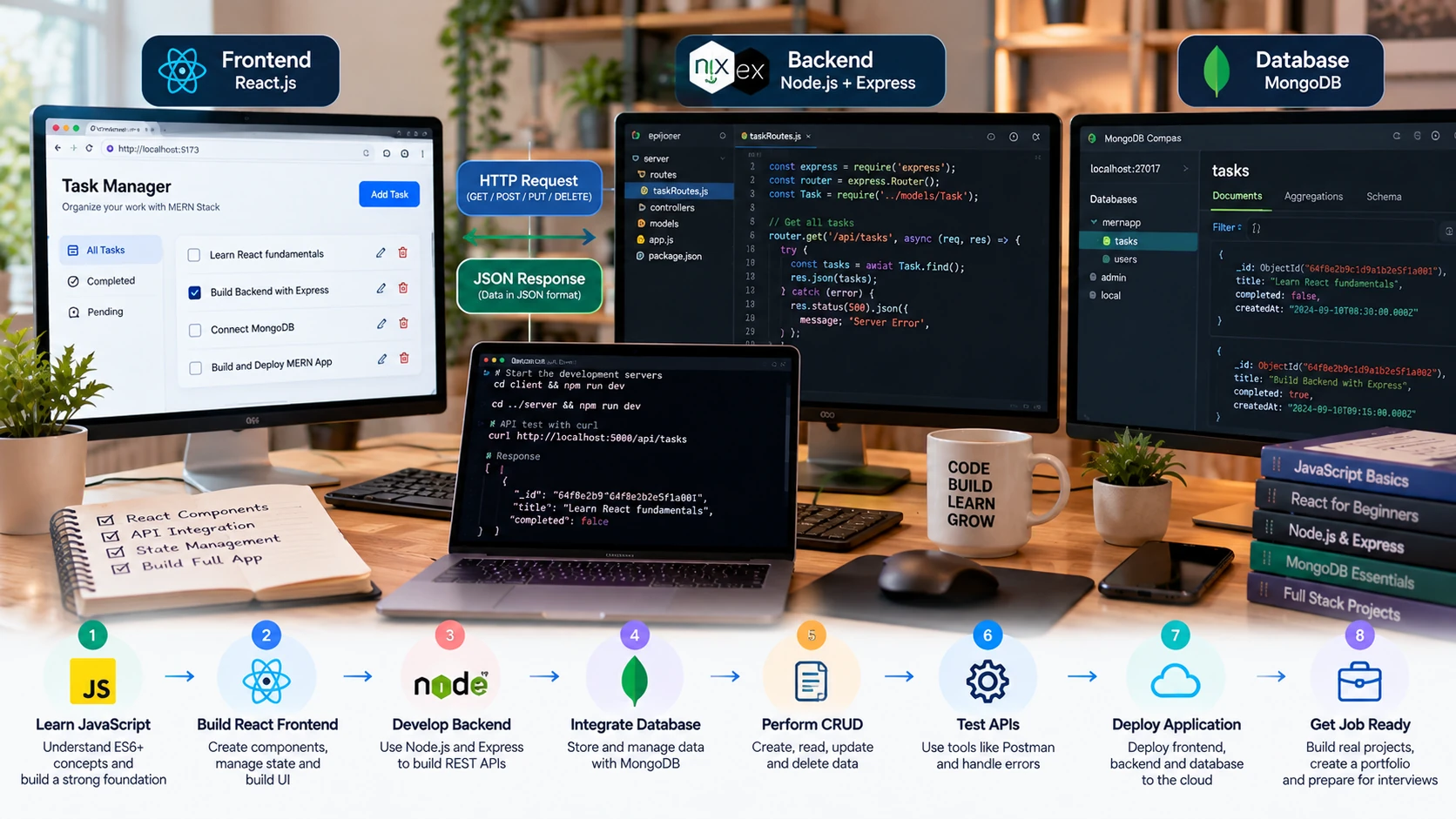
The MERN stack gives JavaScript developers a practical way to build a web application across the browser, server, and database layers. MERN stands for MongoDB, Express, React, and Node.js. These technologies are commonly combined, but learning MERN is not about memorizing four separate tools. The important skill is understanding how data moves through the complete application.
In a typical MERN project, React renders the user interface, the browser sends an HTTP request to an Express API running on Node.js, the server validates the request and reads or changes data in MongoDB, and the API sends a response back to the frontend.
This MERN stack for beginners guide follows that flow. You will learn the prerequisites, current setup, CRUD architecture, data modeling, frontend-to-backend integration, common mistakes, and a roadmap for moving from a simple learning project toward production concepts.
What Is the MERN Stack?
| Technology | Role | Beginner Mental Model |
| MongoDB | Document database | Stores application data |
| Express | Web framework for Node.js | Defines API routes and middleware |
| React | UI library | Renders interactive browser interfaces |
| Node.js | JavaScript runtime | Runs server-side JavaScript |
MERN is one possible full-stack architecture, not a requirement for every JavaScript application. Projects may use a different database, a React framework, another backend framework, or serverless services depending on their requirements.
What Should You Know Before Learning MERN?
A practical MERN stack for beginners path should start with strong JavaScript and React fundamentals before adding backend, database, and deployment concepts. Trying to learn MongoDB, Express, React, Node.js, HTTP, authentication, and deployment at the same time can make a simple bug difficult to locate. Build a foundation first:
- HTML and CSS fundamentals
- Modern JavaScript: functions, arrays, objects, modules, destructuring and async/await
- Basic React: components, props, events and state
- HTTP concepts: requests, responses, methods and status codes
- JSON and basic API concepts
- Terminal, npm and package.json basics
- Git fundamentals
If React is still new to you, complete the React JS tutorial for beginners before trying to debug both frontend and backend code at once.
How a MERN Application Works
Imagine a todo application. When a user submits a new task, the React form collects the input and sends a POST request to an API endpoint such as /api/todos. Express matches the route, server-side code validates the input, and the application writes the todo to MongoDB. The server then returns a response, and React updates the visible list.
Reading a todo list follows the reverse path: React requests data, Express handles the request, MongoDB returns matching documents, the API serializes the result, and the frontend renders it. Understanding this request-response path is more valuable than immediately adding advanced libraries.
Set Up a Current MERN Development Environment
1. Install Node.js
Install a current supported Node.js release from the official Node.js website. npm is included with standard Node.js installations. Check your installation:
node –version
npm –version
If you use Express 5, its official documentation requires Node.js 18 or higher. For a new learning environment, use a currently supported Node.js release rather than choosing an old version only because an outdated tutorial uses it.
2. Create the Backend
Keep the client and server responsibilities obvious while learning. One simple structure is a root project containing server and client directories.
mkdir mern-todo
cd mern-todo
mkdir server
cd server
npm init -y
npm install express dotenv cors
You can use MongoDB’s official Node.js driver directly. Many MERN tutorials also use Mongoose, which provides schemas, models, validation features, and other abstractions. Mongoose is useful, but it is not part of the MERN acronym and it is not required to use MongoDB.
MongoDB provides an official MERN stack quick-start tutorial showing a React application connected to MongoDB through a Node.js backend.
3. Create a MongoDB Database
For learning, you can run MongoDB locally or use MongoDB Atlas. Atlas currently provides Free clusters intended for learning and small-scale development. Create a database user, configure permitted network access, and obtain the connection URI.
Treat the connection string as a secret. Put it in a server-side environment variable and do not commit credentials to Git or expose a database connection string in browser code.
4. Create the React Frontend
Do not start a new tutorial project with Create React App. React officially deprecated it. For a small project focused on learning React from scratch, Vite is a current build-tool option.
cd ..
npm create vite@latest client — –template react
cd client
npm install
npm run dev
React recommends frameworks for many new production applications, while its documentation also supports build tools such as Vite when a framework is not a fit or when you want to learn the basics. For this beginner MERN project, a small Vite client keeps the architecture easy to inspect.
Build the Express API First
Before connecting React, make sure the backend can receive a request and return JSON. Start with a health route, then build one resource such as todos.
import express from “express”;
const app = express();
app.use(express.json());
app.get(“/api/health”, (req, res) => {
res.json({ status: “ok” });
});
app.listen(5000, () => console.log(“API running”));
Test the endpoint independently. This makes debugging easier: if the API already works outside React, a later integration problem is more likely to be in the request URL, browser configuration, frontend logic, or cross-origin setup.
Understand CRUD Before Adding Authentication
| Operation | HTTP Method | Example Route | Purpose |
| Create | POST | /api/todos | Create a todo |
| Read | GET | /api/todos | List todos |
| Update | PATCH | /api/todos/:id | Change part of a todo |
| Delete | DELETE | /api/todos/:id | Remove a todo |
Return appropriate status codes and predictable JSON. Validate incoming data on the server even if the React form also validates it. Client-side validation improves the user experience; server-side validation protects the API boundary.
Model Data in MongoDB
A beginner todo document might contain a title, completed flag, and timestamps. If you use Mongoose, define a schema and model; if you use the official driver, validate and shape data in your application or with MongoDB features appropriate to the project.
Do not assume a document database means ‘no structure.’ Decide which fields are required, what types are expected, which values are allowed, and what indexes are needed as the application grows.
MongoDB’s Mongoose integration tutorial demonstrates schemas, models, validation, and CRUD operations if you choose that abstraction.
Connect React to the Express API
Once the API works independently, connect the React client. The built-in fetch API is enough for a beginner project; Axios is an optional HTTP client rather than a MERN requirement.
async function loadTodos() {
const response = await fetch(“/api/todos”);
if (!response.ok) throw new Error(“Could not load todos”);
return response.json();
}
Your UI should account for loading, error, empty, and success states. When creating, updating, or deleting data, decide whether to refetch the server state or update the interface after a successful response. Avoid showing success before the server has actually accepted the operation.
Your First MERN Project: Todo Application
The best way to learn the MERN stack for beginners is to build one small project that connects the frontend, API, server logic, and database in a complete working flow.
Step 1 — Define the data
Start with title and completed status. Keep version one deliberately small.
Step 2 — Build and test the API
Implement CRUD endpoints and test them without React. Add input validation and centralized error handling.
Step 3 — Connect MongoDB
Persist todos and confirm data survives a server restart. Keep credentials outside source control.
Step 4 — Build the React UI
Create TodoForm, TodoList, and TodoItem components. Keep state ownership understandable.
Step 5 — Integrate frontend and backend
Load todos, create new items, toggle completion, and delete items through the API.
Step 6 — Handle non-happy paths
Show loading, empty, validation, server-error, and network-error states.
Step 7 — Refactor and document
Separate routes, database logic, and UI responsibilities only after the basic flow works. Add a README explaining setup and architecture.
Authentication and Security: Learn Them After CRUD
Authentication is important, but it adds enough complexity that it should not be the first milestone in a beginner MERN tutorial. First understand requests, validation, database operations, and frontend integration.
When you add accounts, learn password hashing, authorization, secure session or token handling, input validation, rate limiting where appropriate, secret management, CORS configuration, and common web security risks. JWT is one possible token format; it is not automatically the correct authentication architecture for every application.
Never store plaintext passwords, expose database credentials to the client, or assume hiding a button in React is authorization. Access control must be enforced on the server.
MERN Stack for Beginners: Practical Learning Roadmap
| Stage | Focus | Proof of Progress |
| 1 | JavaScript, async code, npm, Git | Small JS projects and API exercises |
| 2 | React fundamentals | Interactive frontend without backend |
| 3 | Node + Express + HTTP | Tested JSON CRUD API |
| 4 | MongoDB and data modeling | Persistent CRUD backend |
| 5 | Full MERN integration | Complete todo or notes application |
| 6 | Validation, auth and security basics | Protected user-specific feature |
| 7 | Testing and deployment | Deployed project with documented setup |
| 8 | Production architecture | Frameworks, observability, performance and scaling as requirements demand |
Beginner MERN Project Ideas
After completing one basic CRUD app, MERN stack for beginners practice should focus on small projects that improve data modeling, API handling, validation, error states, and frontend integration.
- Notes app with tags and search
- Expense tracker with categories and monthly summaries
- Simple inventory manager with validation
- Book or movie tracker with status filters
- Support-ticket dashboard with user roles after you learn authentication
For each project, prioritize a complete data flow and error handling over a long feature list. A smaller application you can explain and debug is stronger learning evidence than a copied ecommerce clone with features you do not understand.
MERN Stack vs Full Stack: Are They the Same?
MERN is a specific technology combination used for full-stack development. ‘Full stack’ is broader: a full-stack developer may use React with PostgreSQL, Vue with Laravel, Angular with Java, or many other combinations. Learning MERN gives you one concrete route through frontend, backend, database, and deployment concepts; it does not define all full-stack development.
Common MERN Stack Beginner Mistakes
- Trying to learn all four technologies before becoming comfortable with JavaScript.
- Starting a new React client with an outdated Create React App tutorial.
- Adding JWT, Redux, Docker, WebSockets, payments, and multiple roles to the first CRUD project.
- Putting database credentials or other secrets in frontend code or Git.
- Skipping server-side validation because the React form already validates input.
- Using useEffect for every piece of frontend logic without understanding when synchronization is needed.
- Installing Axios, Mongoose, Redux, or other libraries as if they were mandatory parts of MERN.
- Debugging the entire stack at once instead of testing the database, API, and frontend boundaries separately.
- Ignoring error, empty, loading, and unauthorized states.
What to Learn After the MERN Basics
- TypeScript for stronger type checking across larger codebases
- Testing at unit, API, and browser levels
- Authentication and authorization patterns
- Security fundamentals and dependency management
- Deployment, environment configuration, logging, and monitoring
- Database indexing and query performance
- A React framework when the product needs integrated routing, data loading, rendering strategies, or other production features
- Alternative databases such as PostgreSQL so you understand when relational modeling is a better fit
Frequently Asked Questions
Is the MERN stack good for beginners?
It can be a useful full-stack learning path if you already understand JavaScript basics. Learning each layer in sequence is easier than trying to build a complex full-stack application immediately.
Is MERN still relevant?
MongoDB, Express, React, and Node.js remain actively documented technologies, and MongoDB maintains an official MERN tutorial. Whether MERN is the right stack for a specific job or product depends on its requirements and the target market.
How long does it take to learn the MERN stack?
There is no reliable universal timeline. Your JavaScript and React background, project complexity, practice quality, and definition of ‘learned’ matter more than a fixed number of weeks.
Do I need Mongoose for MERN?
No. You can use MongoDB’s official Node.js driver. Mongoose is a popular optional modeling layer that provides schemas, models, validation, and other conveniences.
Should beginners use Axios or fetch?
Either can make HTTP requests. The browser’s fetch API is sufficient for many learning projects. Use Axios when its API or features solve a need rather than because a tutorial treats it as mandatory.
Should I learn JWT in my first MERN project?
Not necessarily. First build and understand CRUD, validation, database access, and frontend integration. Add authentication once you can reason about the underlying request flow and security responsibilities.
Can MERN use SQL instead of MongoDB?
If you replace MongoDB with a SQL database, the application can still be a JavaScript full-stack application, but technically it is no longer the MERN stack because the M stands for MongoDB.
Final Thoughts
The most useful way to learn the MERN stack for beginners is to follow one piece of data through the complete system. Build a React form, send a request to an Express API, validate it on the Node.js server, persist it in MongoDB, return a clear response, and update the interface.
Once that basic flow is reliable, add authentication, testing, deployment, and more advanced architecture one problem at a time. That approach builds transferable full-stack understanding instead of a project that only works while you follow a tutorial.
