
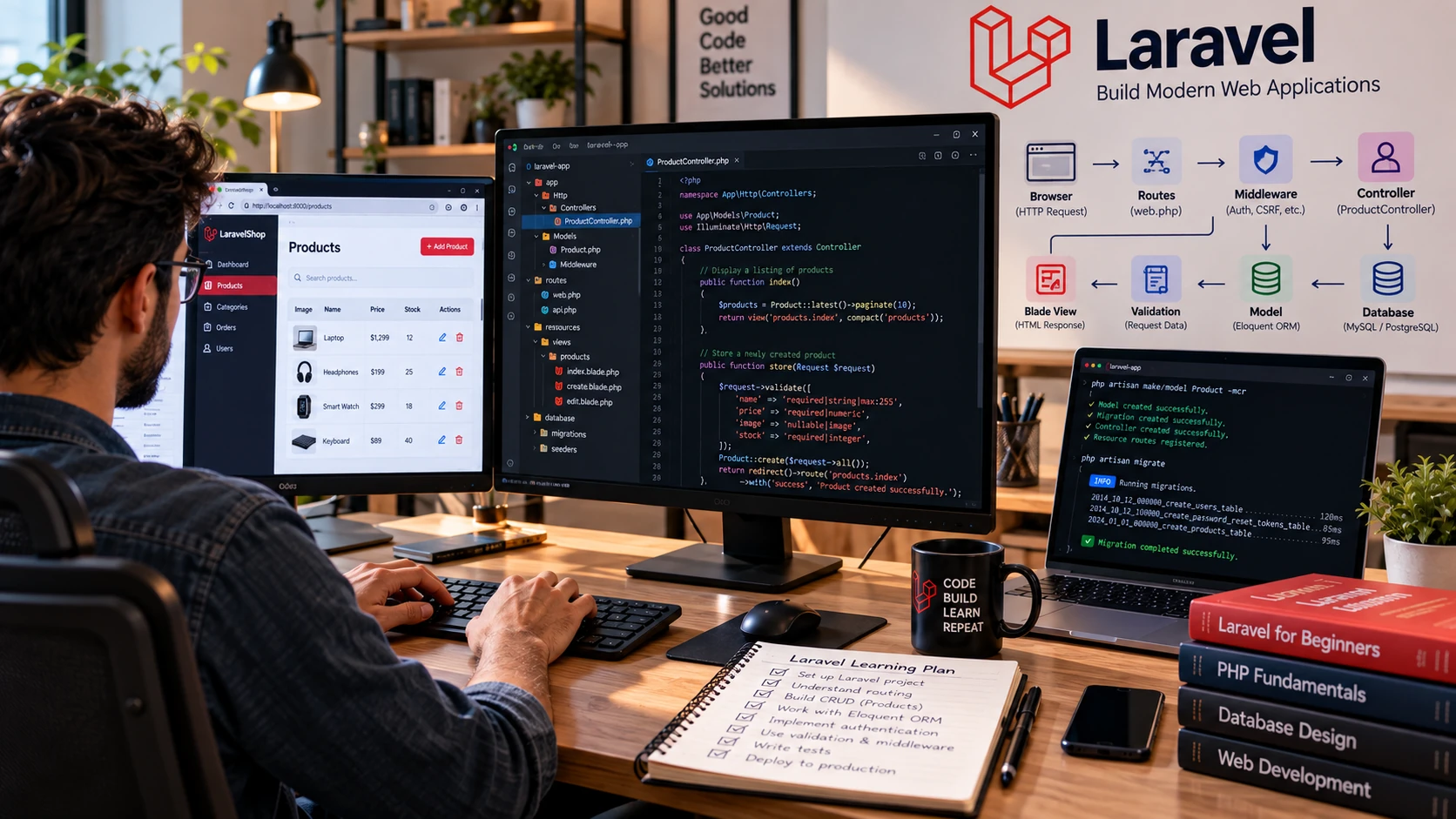
Laravel gives PHP developers a structured way to build web applications without reinventing common application features. It provides routing, database tools, validation, queues, testing support, authentication options, and other framework services while still letting you work directly with PHP.
For beginners, the challenge is not learning every Laravel feature. It is understanding the request flow: a browser sends a request, a route matches it, application code handles the request, models interact with data when needed, and a response returns as HTML or JSON.
This Laravel for beginners guide follows that flow. You will set up a current Laravel project, understand its important directories, build routes and controllers, use Blade and Eloquent, validate input, create a CRUD application, and learn what to study next.
What Is Laravel?
Laravel is an open-source PHP web application framework. It provides conventions and tools for common web-development concerns such as routing, dependency injection, database access, queues, scheduled jobs, caching, validation, and testing.
Laravel applications are often explained with the Model-View-Controller pattern. Models represent and work with application data, views present output, and controllers can coordinate request-handling logic. Laravel is flexible, however, so not every route must use a controller and not every application uses the same frontend approach.
Laravel was created by Taylor Otwell, but beginners do not need framework history or popularity claims to decide whether it fits their goals. A better test is whether the framework is relevant to the PHP applications, jobs, or projects you want to build.
What Should You Know Before Learning Laravel?
A practical Laravel for beginners learning path should start with PHP, object-oriented programming, HTTP, SQL, Composer, and basic command-line skills before moving into framework-specific features.
Laravel is easier when the underlying PHP and web concepts are familiar. Before going deep into the framework, be comfortable with:
- PHP variables, arrays, functions, classes, namespaces, and exceptions
- Object-oriented programming basics
- HTML and forms
- HTTP requests, responses, methods, and status codes
- Basic SQL and relational database concepts
- Composer and package management
- Terminal basics and Git
You do not need to master PHP before creating a Laravel project, but skipping PHP fundamentals makes framework errors much harder to understand.
Set Up Laravel Using the Current Workflow
Framework requirements change between major versions. The current Laravel 13 release requires PHP 8.3 or newer. Do not copy an old ‘PHP 8.1+’ requirement into a current setup guide.
1. Install PHP, Composer, and the Laravel Installer
Laravel’s current installation documentation expects PHP, Composer, and the Laravel installer. It also recommends Node with npm or Bun when you need to compile frontend assets.
php –version
composer –version
If PHP and Composer are already installed, install the Laravel CLI through Composer:
composer global require laravel/installer
Use the current Laravel installation documentation for operating-system-specific setup because supported PHP versions and installation tooling can change.
2. Create a New Laravel Application
laravel new my-app
cd my-app
npm install && npm run build
composer run dev
The installer may ask questions about your preferred database, testing framework, or starter kit. For a fundamentals-first tutorial, starting without a frontend starter kit can make the request flow easier to inspect. Your choices should still reflect the application you actually plan to build.
Understand the Important Laravel Directories
| Location | Beginner Purpose |
| app/Models | Eloquent model classes and domain data behavior |
| app/Http/Controllers | HTTP controller classes |
| resources/views | Blade view templates |
| routes/web.php | Routes for the web interface |
| database/migrations | Database schema changes |
| database/seeders | Code for populating development/test data |
| config | Application and package configuration |
| tests | Automated application tests |
| .env | Environment-specific values; do not commit secrets |
Do not try to memorize every folder on day one. Follow one feature through the project and learn directories as you need them.
Core Laravel Concepts Beginners Need
Routing
Routes decide how the application responds to incoming URLs and HTTP methods. Web-interface routes normally begin in routes/web.php.
use Illuminate\Support\Facades\Route;
Route::get(‘/posts’, function () {
return ‘Posts’;
});
Laravel supports GET, POST, PUT, PATCH, DELETE, and other routing patterns. Use the HTTP method that matches the action rather than making every operation a GET request.
Controllers
As request logic grows, controllers provide a clear place to coordinate it. A controller can validate input, call models or services, and return a view, redirect, or JSON response.
php artisan make:controller PostController –resource
Resource controllers are useful for CRUD conventions, but beginners should understand what each action does rather than generating files they cannot explain.
Blade Views
Blade is Laravel’s server-side templating engine. It supports layouts, components, loops, conditions, escaping, forms, and other view features. Keep presentation concerns in views and avoid turning templates into large blocks of application logic.
<h1>{{ $post->title }}</h1>
@foreach ($posts as $post)
<p>{{ $post->title }}</p>
@endforeach
Migrations
Migrations describe database schema changes in code so a team can apply the same changes consistently across environments.
php artisan make:migration create_posts_table
php artisan migrate
Treat migrations as application history. In a shared or deployed project, changing an already-applied historical migration can create inconsistencies; create a new migration for later schema changes when appropriate.
Eloquent ORM
Eloquent maps database tables to PHP model classes and provides query and relationship APIs. It can make common database work expressive, but beginners should still understand the SQL concepts underneath it.
$posts = Post::query()->latest()->get();
$post = Post::findOrFail($id);
Learn one-to-one, one-to-many, and many-to-many relationships after basic CRUD. Also learn eager loading so relationship-heavy pages do not accidentally issue excessive database queries.
Validation
Never assume browser input is valid. Laravel can validate request data before it reaches database operations.
$validated = $request->validate([
‘title’ => [‘required’, ‘string’, ‘max:255’],
‘body’ => [‘required’, ‘string’],
]);
Validation is not only a security concern; it also defines the data your application accepts. Return useful feedback to users and enforce important rules on the server.
Build Your First Laravel Project: A Simple Blog
The best way to practice Laravel for beginners is to build one small CRUD project that connects routes, controllers, validation, Blade views, migrations, Eloquent models, and database operations. A small blog is a useful beginner project because it covers routes, controllers, forms, validation, models, migrations, views, and CRUD without requiring advanced architecture.
Step 1 — Create the Post Model and Migration
Create a Post model with a migration. Add a title and body first; keep version one small.
Step 2 — Run the Migration
Configure your database, review the generated migration, then apply it. Confirm the table exists before building the UI.
Step 3 — Create CRUD Routes and a Controller
Implement index, create, store, edit, update, and destroy behavior. Use Laravel’s resource conventions once you understand the mapping.
Step 4 — Build Blade Views
Create a shared layout and views for listing posts, creating a post, and editing a post. Escape user-controlled output unless you have a deliberate reason not to.
Step 5 — Validate Form Input
Require a valid title and body on the server. Display validation errors near the form fields.
Step 6 — Add CSRF-Protected Forms
Use Laravel’s CSRF protection in state-changing web forms and use the correct HTTP method conventions for update and delete actions.
Step 7 — Handle Missing Records
Use predictable 404 behavior rather than allowing null data to produce an unrelated application error.
Step 8 — Add Tests
Test at least the important CRUD flow and validation behavior. A working browser demo is useful; automated tests provide repeatable evidence.
Understand Laravel’s Request Flow
When a user submits the create-post form, the request reaches the application, routing determines the destination, middleware may run, the controller validates the input, Eloquent writes the record, and the application redirects or returns a response. Blade then renders data when the next page is requested.
When debugging, trace this flow rather than randomly editing files. Ask: Did the route match? Did middleware block the request? Did validation fail? Did the query run? Did the controller pass the expected data to the view? This habit is more transferable than memorizing Artisan commands.
Authentication and Starter Kits
Authentication is important, but you do not need it in your first CRUD lesson. First understand routes, requests, validation, models, views, and database operations.
When you do need authentication, Laravel provides official starter kits. Current first-party options include React, Vue, Svelte, and Livewire approaches, with authentication features already integrated. Starter kits can save time, but beginners should know which code and behavior the kit is providing.
Review the current Laravel starter kits before following an older tutorial that recommends packages or starter-kit workflows that have changed.
Laravel APIs vs Blade Applications
Laravel can serve HTML through Blade, act as an API backend for a JavaScript or mobile frontend, or combine server-side and client-side approaches. Beginners do not need to learn every architecture simultaneously.
If you plan to use Laravel as an API backend with React, first strengthen your frontend foundation with our React JS tutorial for beginners.
Start with a Blade CRUD application if your goal is to understand Laravel’s core request cycle quickly. If your target project is an API, learn JSON responses, API validation, authentication and authorization, rate limiting where appropriate, and API testing after you understand the framework basics.
Laravel for Beginners: Practical Learning Roadmap
| Stage | Focus | Evidence of Progress |
| 1 | PHP, OOP, Composer, HTTP and SQL basics | Small PHP exercises and database queries |
| 2 | Laravel setup, routes, requests and Blade | Multi-page Laravel application |
| 3 | Controllers, validation, migrations and Eloquent | Complete CRUD project |
| 4 | Relationships, authorization and file handling | More realistic data model and protected actions |
| 5 | Authentication, mail, queues and scheduled work as needed | Feature that uses background or user-specific behavior |
| 6 | Testing, debugging and security fundamentals | Automated feature tests and handled edge cases |
| 7 | Deployment, caching, logging and environment configuration | Deployed project with documented setup |
Beginner Laravel Project Ideas
After completing your first CRUD application, Laravel for beginners practice should focus on small projects that improve validation, relationships, authorization, testing, and error handling without adding unnecessary complexity.
- Blog with categories and comments
- Task manager with users and authorization
- Simple inventory application with validation and search
- Support-ticket system with statuses
- Booking or appointment prototype with availability rules
Keep the first version narrow. A complete project with validation, authorization, tests, and clear error handling teaches more than a large ecommerce clone whose important behavior comes from copied code.
Common Laravel Beginner Mistakes
- Learning Laravel without enough PHP or object-oriented programming fundamentals.
- Following version-specific setup instructions without checking the current Laravel documentation.
- Putting large amounts of business logic directly into routes or Blade templates.
- Trusting client-side validation and skipping server-side validation.
- Using raw user input in database or output flows without understanding Laravel’s protections.
- Committing .env secrets or production credentials to source control.
- Using Eloquent relationships without understanding query behavior or eager loading.
- Adding authentication, queues, events, APIs, payments, and complex architecture before completing basic CRUD.
- Assuming a successful local demo means an application is production-ready.
What to Learn After Laravel Fundamentals
- Authorization with policies and gates
- Authentication appropriate to your application
- Eloquent relationships, scopes and query performance
- Form requests and reusable validation
- Service container and dependency injection
- Events, jobs, queues and scheduled tasks
- Testing with Laravel’s current testing tools
- Caching, logging and observability
- API design and authentication if you build APIs
- Deployment, environment configuration and production security
Frequently Asked Questions
Is Laravel good for beginners?
Laravel can be beginner-friendly once you understand basic PHP, OOP, HTTP, and databases. The framework provides clear conventions, but those conventions are easier to debug when you understand the underlying language and web concepts.
Which PHP version does Laravel require?
The requirement depends on the Laravel major version. Laravel 13 requires PHP 8.3 or newer. Always check the current release and installation documentation before setting up a new project.
Do I need to learn PHP before Laravel?
Yes, learn the fundamentals first. You do not need expert-level PHP, but functions, classes, namespaces, arrays, exceptions, and object-oriented concepts should be familiar.
Is Laravel only for Blade websites?
No. Laravel can render Blade views, power APIs, and work with frontend approaches such as React, Vue, Svelte, or Livewire depending on the application architecture.
Should a beginner use a Laravel starter kit?
A starter kit can be useful when you need authentication and a supported frontend stack. For your first fundamentals project, building a small feature without a starter kit can make Laravel’s core request flow easier to understand.
How long does it take to learn Laravel?
There is no universal timeline. PHP experience, database knowledge, practice quality, project complexity, and your definition of job readiness all matter. Measure progress by what you can build, test, debug, and explain independently.
Final Thoughts
The best way to learn Laravel for beginners is to follow one feature through the framework. Define a route, handle the request, validate input, work with data through Eloquent, return a Blade view or response, and test the behavior.
Once you can build and debug a small CRUD application independently, add relationships, authorization, authentication, queues, APIs, and deployment concepts as real project requirements create the need. That produces a stronger foundation than trying to memorize Laravel’s entire ecosystem at once.
