
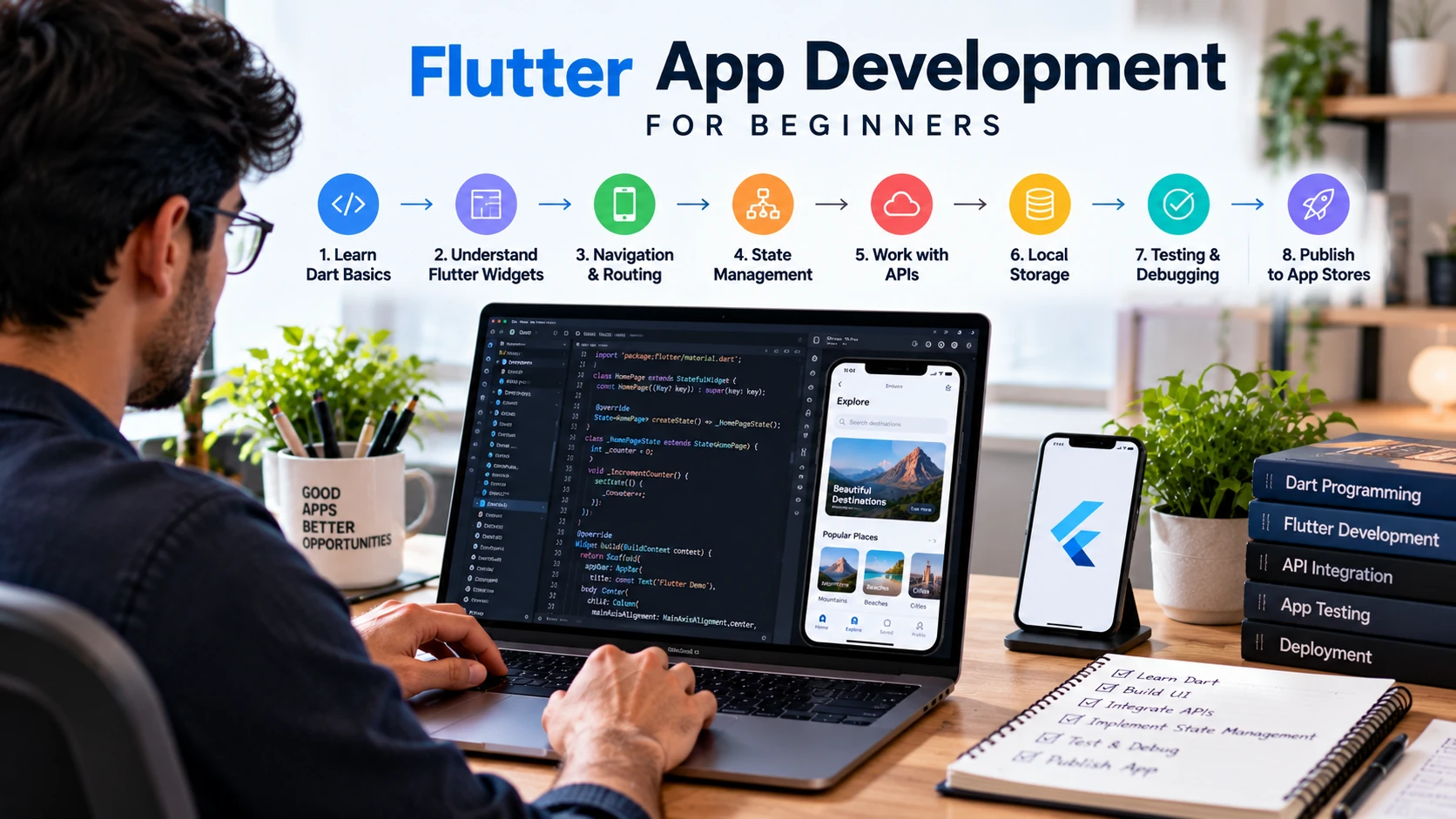
Flutter can look deceptively simple when your first tutorial produces a working screen in a few minutes. The difficult part comes later: understanding Dart, structuring widgets, managing changing state, calling APIs, storing data, debugging failures, testing important behavior, and preparing an application for release.
Flutter app development for beginners becomes easier when these skills are learned in the right order. Start with Dart fundamentals, set up a reliable development environment, build a small app, and then add navigation, state management, networking, storage, architecture, and testing as your projects become more realistic.
This guide provides an evergreen learning roadmap rather than a list of widgets to memorize. The goal is to help you reach the point where you can build, debug, explain, and improve a complete Flutter application.
What Is Flutter App Development?
Flutter is an open-source framework for building applications from a shared codebase. Flutter uses the Dart programming language and a widget-based UI model. It supports multiple platforms, including Android and iOS, while also supporting web and desktop targets.
A shared codebase does not mean every platform behaves identically. Real applications may still need platform-specific configuration, permissions, integrations, testing, or native code. Beginners should understand Flutter as a cross-platform framework, not as a guarantee that every feature requires zero platform-specific work.
Is Flutter Good for Beginners?
Flutter can be a practical starting point for someone who wants to learn application development because visual results appear quickly and the official documentation provides a structured learning path. However, the framework becomes much easier when you understand basic programming first.
You do not need to master Dart before opening Flutter, but you should be comfortable with variables, functions, conditions, collections, classes, null safety, asynchronous code, and basic object-oriented concepts. Learn a Dart concept and apply it immediately in a small Flutter exercise.
If you are deciding between different mobile paths, compare this guide with the Android app development for beginners guide rather than assuming cross-platform or native development is automatically better for every goal.
What You Need Before You Start
A reliable environment is an important part of Flutter app development for beginners because setup problems can interrupt learning before you even start building real features. Configure the required tools first and confirm that your development environment works correctly.
| Requirement | Purpose |
| Computer that meets current Flutter/tool requirements | Runs the SDK, editor, builds, and emulators or simulators. |
| Flutter SDK | Provides the framework and command-line tooling. |
| VS Code or Android Studio | Common development environments with Flutter/Dart support. |
| Android tooling | Required when building and testing Android applications. |
| Xcode on macOS | Required for building and signing iOS applications. |
| Git | Useful for version control and portfolio projects. |
Follow the current Flutter installation documentation because supported operating systems, tool versions, and setup steps can change. After installation, use Flutter’s diagnostic tooling to identify missing dependencies instead of guessing at environment problems.
Learn Dart Before Going Deeper Into Flutter
Dart controls your application logic, models, asynchronous operations, and much of the code you write around Flutter widgets. The official Dart language documentation is the authoritative reference when language behavior is unclear.
Prioritize these concepts:
- Variables, types, operators, and control flow
- Functions and named parameters
- Lists, maps, and collection operations
- Classes, constructors, and object-oriented basics
- Null safety
- Futures, async, and await
- Exceptions and basic error handling
Do not spend months studying Dart in isolation. Once you can read and write small programs, move into Flutter and revisit the language when a real project exposes a gap.
Build Your First Flutter App
Your first project should teach the development loop rather than solve a large business problem. A small task app or counter with an editable list is enough to practice UI, state, user input, and debugging.
1. Create and Run a Project
Create a starter project and follow Flutter’s current learning pathway. Run the application on an emulator, simulator, supported desktop target, or physical device. Confirm that your environment works before adding packages or architecture.
2. Read the Widget Tree
Identify the application root, screen-level widgets, layout widgets, and smaller reusable elements. Change text, spacing, and a visual property, then use hot reload to observe the result. The purpose is to understand composition: larger interfaces are built from smaller widgets.
3. Add Simple State
Add a value that changes after user interaction—for example, a counter, selected item, or list entry. Start with local state where appropriate. Learn what causes the UI to rebuild and keep the state as close as practical to the part of the interface that needs it.
4. Debug a Failure
Introduce or encounter a small error and read the message instead of immediately copying it into a search box. Check the stack trace, relevant source line, runtime state, and assumptions in your code. Debugging should begin with your first project, not after you start applying for jobs.
Core Flutter Concepts Beginners Need to Learn
Stateless and Stateful UI
Understand the difference between configuration that can be represented without mutable local state and UI that reacts to changing data. Do not interpret this as a rule that every dynamic screen must become one large stateful widget.
Layouts and Responsive UI
Practice Row, Column, flexible sizing, padding, alignment, scrolling, lists, and constraints. Test more than one screen size and longer content. A layout that works on one emulator is not automatically responsive.
Navigation
Learn how screens are represented, how users move between them, and how data reaches the destination that needs it. Start with a small multi-screen flow before exploring complex routing requirements.
State Management
Begin with Flutter’s built-in state concepts. When application state becomes shared or complex, evaluate an approach that fits the project. Provider, Riverpod, Bloc, and other libraries exist, but beginners should understand the problem before choosing a package because a tutorial says it is popular.
APIs, JSON, and Storage
Learn HTTP requests, JSON parsing, data models, loading states, empty states, failures, and retry behavior. Then practice local persistence for data that should survive application restarts. Authentication adds another layer and should include secure handling rather than storing sensitive values casually.
Testing and Code Quality
Write tests where they provide useful confidence. Flutter supports different testing levels, and the official testing documentation explains the current tools and distinctions. Testing is most useful when it protects important logic or user flows, not when it is added only to increase a test count.
Flutter App Development for Beginners: Complete Roadmap
Phase 1 — Dart Fundamentals
Build small Dart exercises using functions, collections, classes, null safety, and async/await. Outcome: you can read and write basic Dart without copying every line.
Phase 2 — Flutter UI Fundamentals
Learn widget composition, layouts, forms, themes, lists, and responsive behavior. Outcome: a polished single-screen application.
Phase 3 — Navigation and State
Create a multi-screen app and manage local and shared state deliberately. Outcome: you can explain where state lives and why.
Phase 4 — APIs and Persistence
Consume an API, map JSON into models, show loading/error states, and save selected data locally. Outcome: an app that handles real data and failures.
Phase 5 — Architecture and Packages
Organize code so UI, data access, and business rules do not become one file. Evaluate packages for maintenance, documentation, compatibility, and actual need. Outcome: another developer can follow the project structure.
Phase 6 — Testing, Debugging, and Performance
Add meaningful tests, use debugging tools, inspect rebuilds or performance problems when necessary, and handle edge cases. Outcome: a more reliable project with documented fixes.
Phase 7 — Release and Portfolio
Prepare release builds, understand signing and store-specific requirements, document the project, and test on real devices where possible. Outcome: a portfolio project you can demonstrate and explain.
Flutter vs Native Android and iOS Development
| Factor | Flutter | Native Development |
| Codebase | Much application code can be shared across supported platforms | Platform applications are developed with their native stacks |
| UI approach | Flutter widget and rendering model | Platform-native UI frameworks |
| Platform-specific work | Still needed for some capabilities and configuration | Directly part of the platform stack |
| Best choice | Depends on product, team, integrations, performance needs, and career goals | Depends on the same project and career constraints |
Do not choose only from a generic pros-and-cons list. If you are learning for employment, inspect actual vacancies in your target market. If you are building a product, evaluate required integrations, team expertise, platform behavior, maintenance, and release needs.
Best Flutter Projects for Beginners
Projects make Flutter app development for beginners more practical because they turn individual concepts into complete application workflows. Start with manageable projects and gradually add APIs, persistence, authentication, validation, and better error handling.
| Project | Skills Practiced | Useful Upgrade |
| Task or notes app | Forms, lists, local state, persistence | Search, edit, empty states |
| Weather app | HTTP, JSON, models, loading/errors | Location selection and caching |
| Expense tracker | Forms, validation, storage, state | Filtering and summary views |
| Simple catalog | Lists, navigation, reusable widgets | API data and favorites |
| Authenticated app | Forms, navigation, API integration | Session handling and error recovery |
For portfolio projects, include screenshots, setup instructions, architecture notes, packages used, limitations, and what you would improve next. A smaller original project that you understand is stronger evidence than a large tutorial clone.
A Practical 12-Week Example Learning Plan
This is an example schedule, not a guaranteed job-readiness timeline.
| Weeks | Focus | Outcome |
| 1–2 | Dart fundamentals | Small Dart exercises |
| 3–4 | Widgets, layouts, forms | Single-screen Flutter app |
| 5–6 | Navigation and state | Multi-screen app |
| 7–8 | APIs, JSON, storage | Data-driven app with error states |
| 9–10 | Architecture, testing, debugging | Structured and tested project |
| 11–12 | Polish, release workflow, portfolio | Documented project you can demonstrate |
Flutter Developer Job-Readiness Checklist
Flutter app development for beginners should eventually move beyond tutorials toward skills you can demonstrate independently. Before applying for jobs, compare your abilities with current vacancies in the market where you want to work and identify any gaps that still need practice.
- Explain Dart fundamentals and asynchronous code.
- Build responsive Flutter screens from a design or requirement.
- Manage navigation and application state.
- Consume an API and handle loading, empty, and error states.
- Persist local data appropriately.
- Use Git for normal development workflows.
- Debug build and runtime problems.
- Explain your project structure and package choices.
- Write useful tests for important behavior.
- Prepare and test a release build.
If you want to strengthen quality-assurance knowledge alongside development, CareerTechGuide’s software testing career guide covers testing as a separate career and skill area.
Common Mistakes Flutter Beginners Should Avoid
- Learning Flutter widgets without learning enough Dart to understand the code.
- Copying complete tutorials without rebuilding features independently.
- Choosing a state-management library before understanding state.
- Installing packages for problems that can be solved simply with the framework or language.
- Putting networking, business logic, state, and UI into one large widget.
- Ignoring loading, empty, offline, permission, and error states.
- Testing on only one screen size or device type.
- Building many unfinished demos instead of one documented project.
Frequently Asked Questions
Is Flutter easy for beginners?
Flutter can be beginner-friendly when programming fundamentals and Dart are learned alongside the framework. The difficult part is not creating the first screen; it is learning to structure and debug complete applications.
Should I learn Dart before Flutter?
Learn the Dart fundamentals first, then continue learning Dart while building Flutter projects. You do not need to master the entire language before creating your first app.
Can Flutter build Android and iOS apps?
Yes, Flutter supports Android and iOS from a shared application codebase, but platform-specific configuration, integrations, signing, permissions, and testing may still be required.
Is Flutter better than native development?
There is no universal winner. The better choice depends on product requirements, platform-specific needs, team skills, maintenance constraints, and career goals.
Which state management should a Flutter beginner learn?
Start by understanding Flutter’s state model and simple local state. Move to a dedicated approach when your project creates a real need for shared or more complex state.
How long does it take to learn Flutter?
There is no reliable universal timeline. Previous programming experience, practice time, project complexity, and the level expected by employers all affect progress. Judge readiness by what you can build and explain independently.
Final Thoughts
Flutter app development for beginners becomes more manageable when you stop treating the framework as a collection of widgets. Learn Dart, build a small working app, understand state and navigation, then add APIs, persistence, architecture, testing, and release knowledge as your projects grow.
Measure progress by what you can build, debug, document, and explain without copying a tutorial. That foundation makes it easier to learn new Flutter APIs and packages as the ecosystem changes.
